Performer Tag Replace
Overview
This plugin provides the ability to replace text in performer tags. Once installed a settings page will be added to Picard’s options, which is where the plugin is configured.
What it Does
This plugin reads the track metadata provided to Picard, extracts the list of associated instrument and vocal performers, and updates the performer keys based on the original/replacement pairs specified in the settings panel.
Option Settings
The settings panel allows the user to provide a list of the original/replacement pairs used to modify the keys for the performer tags.
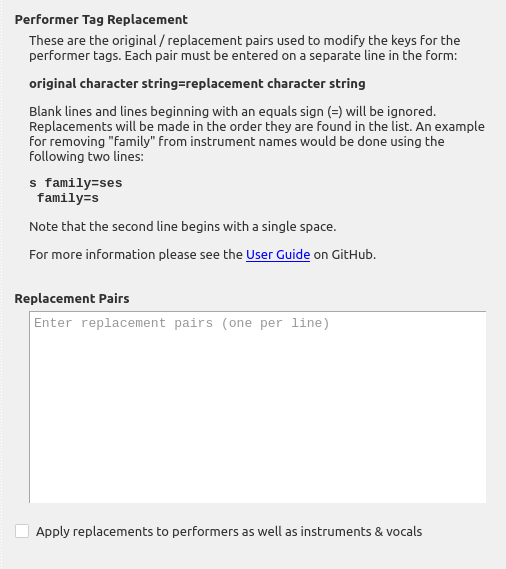
original character string=replacement character string
Blank lines and lines beginning with an equals sign (=) will be ignored. Replacements will be made in the order they are found in the list.
There is also a setting which allows the user to choose whether or not to apply the replacements to the artist values in addition to the instrument / vocal keys. By default, only the keys are processed.
Examples
Example 1:
Suppose that you don’t like instruments listed as “instrument family”, but would rather have it shown as the plural of the instrument. This could be done using the following:
==========================================
= Remove "family" from instrument groups =
==========================================
s family=ses
 family=s
Note that the last line begins with a single space.
This would cause the performer credit Performer [guitar family]: Chet Atkins to be changed to Performer [guitars]: Chet Atkins.
Note that the s family=ses would match an instrument family where the instrument ended in “s” and add “es” rather than just an “s”. For example if there was a “bass family”, this would change it to “basses” rather than “basss”. (As of this writing, I don’t think there are any cases in the database where the instrument in an instrument family ends with an “s”, so that replacement pair should never be triggered.)
Example 2:
Suppose that you don’t like the term “additional”, but would rather have it shown as “extra”. This could be done using the following:
==================================
= Change "additional" to "extra" =
==================================
additional=extra
This would cause the performer credit Performer [additional background vocals]: Jeen to be changed to Performer [extra background vocals]: Jeen.
Example 3:
Suppose that you want to show the instrument as “drums” rather than “drums (drum set)”, or “membranophone”. This could be done using the following:
=====================================
= Standardize instrument to "drums" =
=====================================
drums (drum set)=drums
drum set=drums
membranophone=drums
This would cause the performer credit Performer [membranophone]: Ringo Starr to be changed to Performer [drums]: Ringo Starr.
Source Code
The source code for this plugin is available on GitHub.